Pages

Showing posts with label vmware. Show all posts

Tuesday, January 7, 2014

Script to backup ESXi configurations for all hosts in the cluster


This script is used to backup the ESXi configuration of all the hosts in the cluster. This backup will serve in the event if a VMware host has to be rebuild and if the configuration of a host goes corrupt  or compromised.This is a powershell script that requires the vmware powercli module.


#This script will backup the hosts Configuration


#Created By: Ruby Nahal

#run as scheduled task using the a service account that has 
#administrative rights on vcente. vcenter must have powercli installed

#this script creates the backup in D:\esxibackups and each backup is replaced # by the new one

# it also copies the backups to \\fileserver\share\backups


#Load the vmware powershell snapin

add-pssnapin vmware.vimautomation.core


#Connect to the vCenter Server

Connect-VIServer vcenter-01


#grab the list of hostnames

$esxihosts = get-VMhost | select name


#Print the list

Write-Output $esxihosts


#variable of type string to convert the object $esxihost to string value

[string]$esxihostname

Foreach ($esxihost in $esxihosts)

                {

                $esxihostname = $esxihost.Name

                Write-Output $esxihostname

                Get-VMHostFirmware -VMHost $esxihostname -BackupConfiguration -DestinationPath D:\esxibackups

                }

Copy-Item -Path D:\esxibackups -Destination \\fileserver\share\backups -Recurse -Force

Tuesday, December 31, 2013

How to deploy an ova template (vAPP) for vCenter Operations Manager (vCOPS) without a DRS license


To deploy the vCenter operations manager which can be downloaded as a ova file, a DRS license is required. If you attempt to deploy the template without a DRS license, you will receive the following error

"Cannot deploy OVF descriptor on cluster-01 since it contains a vAPP and the cluster is not in DRS mode"

vCenter Operations manager foundation now is available free from the VMware website. So how to deploy it? Well, here  is how

vAPP is essentially just a container for virtual machines that holds settings for the two virtual machines such as IP pools, boot order etc. vAPP can be treated as a single entity and has the options to turn on or off the vAPP. However, vAPP can be split and the individual virtual machines can be taken out from the vAPP by removing the vAPP layer. vCOPs contains two VMs - UI VM and Analytics VM which are part of the vAPP. Please do remember, a vCenter license is required. vCOPs cannot work without vCenter.

To split the vAPP we must first deploy the vAPP. For example I have a cluster of 3 hosts on the vCenter. Follow the steps below to deploy the vAPP

  1. Remove one of the hosts from the cluster such that it is no longer part of the cluster but still a part of the datacenter. For achieving this, you can either drag and drop the host out of the cluster or you can remove the host to the cluster and add the host at the datacenter level. You will have to remove all VMs from the host and take it in maintenance mode.
  2. Once the host is no longer a part of the cluster but just a part of the datacenter, deploy the vAPP on the host. You will have to configure the vAPP with IP settings, name etc.
  3. Once the vAPP has been deployed, turn on the vAPP. Wait for both the VMs to be up and running. Once the VMs are up and running, make sure you can access the UI VM. Check the DNS settings and the make sure you have DNS entries for the VMs on your DNS servers. VMs must be able to resolve each other.
  4. If you can access the registration page, we are good to go. You can either to register the vCOPs with the vCenter server now or later. You will need an account with admin privileges on vCenter to complete the registration.
  5. Now turn off the vAPP and after the vAPP has completely turned off, move the server back into the cluster by dragging and dropping the server into the cluster. This will remove the vAPP layer and you will see two VMs in the cluster called UI VM and Analytics VM.
  6. You might receive an error and you can choose to ignore it.
  7. It is very IMPORTANT that you turn on the analytics VMs at least 10 minutes before the UI VM. You will break it if you mess up the boot order. The vAPP is no longer there to manage the boot order, so the boot order will have to be managed manually.

And this is it. vCenter operations manager has been deployed.

Friday, December 27, 2013

How to find if a balloon driver is enabled on Virtual Machines on a VMware host


  1. Open ssh connection to the host.
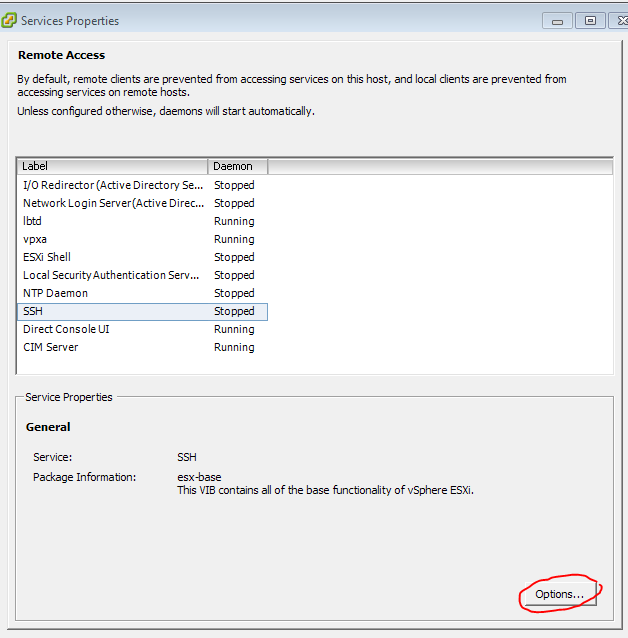
NOTE: you will have to enable the SSH service by connecting to the host in vsphere client. Go to configuration>security profile> services 'properties' > select SSH and click on options> start.
 
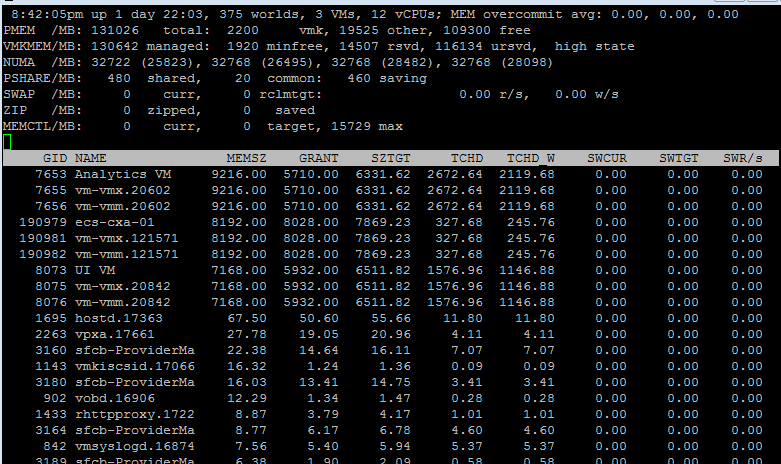
2. After logging in, type in the command esxtop, by default vmware displays CPU attributes.


 3.  By press 'm' to switch to memory view.
  4. We are looking for the MCTL attribute which might not be in the list of attributes being displayed, so press 'f' to edit the list of attributes being displayed.
  5. You can toggle the field to show or not by pressing the corresponding letter. Like in this case, press 'j' to display the MSTL attribute 
6. The MCTL attribute will show 'y' if the balloon driver is enabled.